You’re at work, rushing to edit a PDF. You Google “PDF editor”, click the first link, and download what looks like the perfect tool.
But what if that simple search just opened the door to a cyberattack?
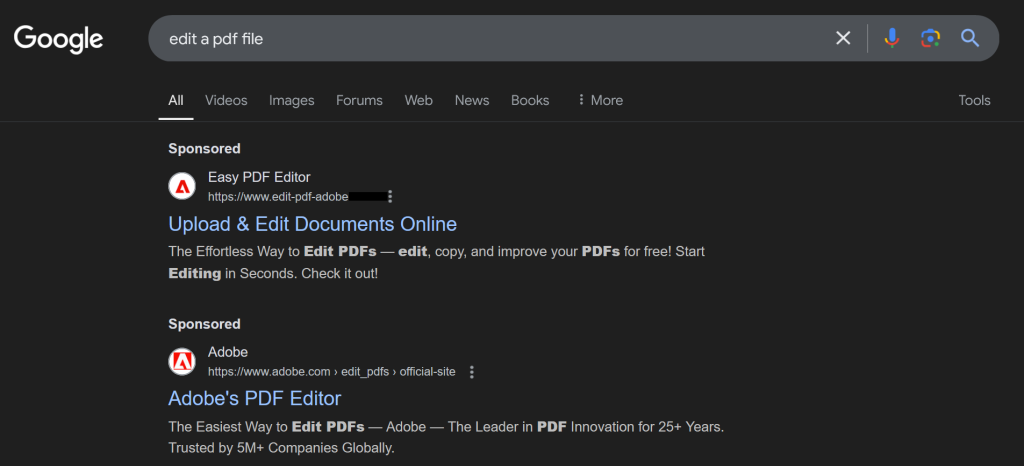
That’s exactly what happened here. A user thought they were downloading a harmless PDF editor.
Instead, they unknowingly installed malware, and just like that, attackers had remote access to their machine.
This is called malvertising (malware, advertising).
What is malvertising?
Malvertising is a technique used by cybercriminals to embed malicious content, such as code or programs, within online advertisements. These ads often appear on well-known websites, making them seem trustworthy. Once a user interacts with the ad, it can trigger the download of malware, spyware, or ransomware without their knowledge.
Let’s break it down attack and how you can prevent malvertising:
Step 1: The setup – A malicious Google ad
Cybercriminals don’t need to send phishing emails anymore, they just buy ads on Google and wait for you to come to them.
That’s what happened in this case.
- The user searched for “PDF editor”
- Clicked on a malvertising link
- Downloaded an EXE file posing as a legit PDF tool
- Ran the installer, unknowingly executing a trojanized program
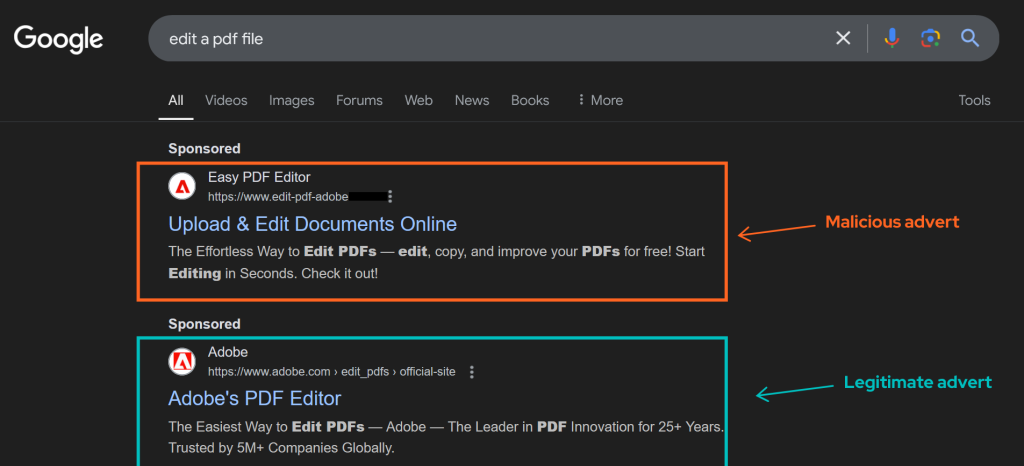
At first, everything looked fine. No red flags. No warnings. Just a seemingly normal PDF editor. But behind the scenes? The malware had already made itself at home.
Step 2: The silent infection – What the malware did
Once executed, the EXE did exactly what the attackers designed it to do:
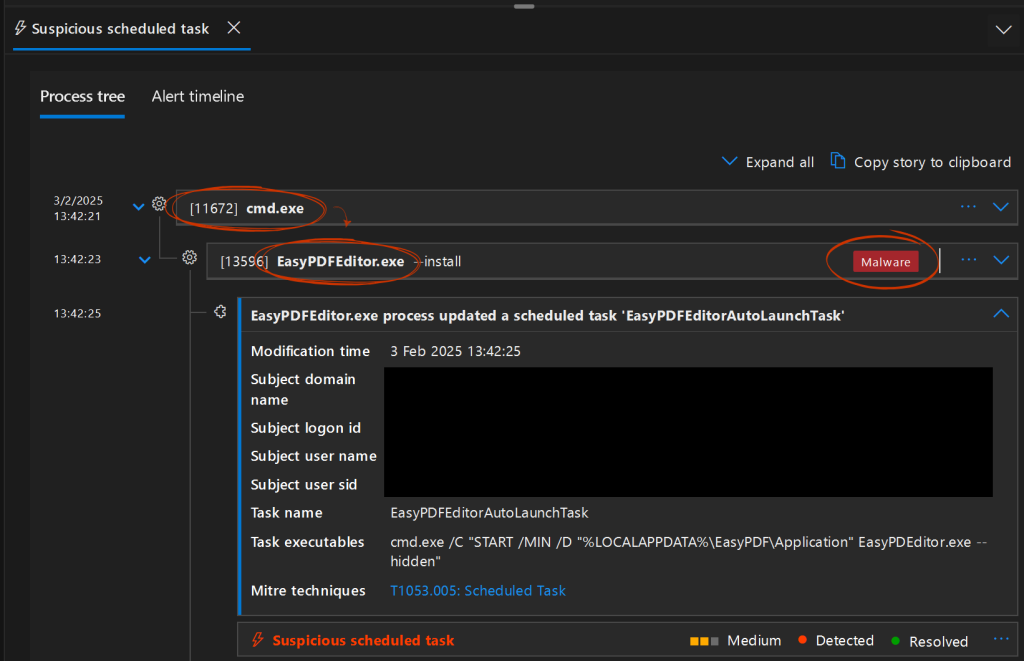
- Created a scheduled task that launched the malware on every startup
- Ran in hidden mode, so the user never noticed it running
- Maintained persistence, surviving reboots
- Established a backdoor, giving attackers remote access
Because the malware didn’t require admin privileges to install, even restricted users were vulnerable. It slipped past basic security measures without a hitch.
Traditional antiviruses can’t catch these types of attacks. Why? Because AV relies on known threats, and this EXE had never been flagged before.
Step 3: The attack meets a 24/7 SOC
This is where things took a turn…for the attackers.
When this file executed, it triggered a behavioural detection in our MXDR (Managed Extended Detection & Response) platform. Unlike traditional antivirus, MXDR looks at behaviour, not just known malware signatures, and something about this EXE didn’t add up.
How fast did we shut it down?
✅ 0 min → Indicators of Compromise (IOCs) are automatically analysed, enriched, and triaged using Threat Intelligence sources like Recorded Future
✅ 5 min → Identified the EXE launching command prompt activity
✅ 3 min → Traced the infection back to a malvertising download
✅ 10 sec → Isolated the machine, cutting off attacker access instantly
Total time to neutralise? Less than 10 minutes.
If this attack had gone unnoticed, it could have escalated quickly spreading across the network, stealing credentials, or deploying ransomware.
But our 24/7 SOC was on it, stopping the attack before it could do real damage.
Why this attack matters (and why you should care)
Attacks like this aren’t rare, they’re the new norm. Cybercriminals don’t rely on hacking in anymore. They’re using SEO poisoning, Google Ads, and social engineering to let users download the malware themselves.
And if you’re only relying on antivirus or don’t have a dedicated SOC team, these threats will slip through.
Here’s how you can prevent malvertising attacks:
- Be cautious with Google Ads: malvertising is on the rise.
- Monitor scheduled tasks: unexpected ones could be a red flag.
- Restrict software installation permissions to prevent unauthorised installs.
- Deploy MDR or MXDR (not just antivirus!) to catch behavioural threats.
But most importantly? You need a team that can catch and stop these attacks before they escalate.
Real-world examples of malvertising
This isn’t just a one-off incident. 1 in every 100 ads comes with malicious content . Here are some recent examples:
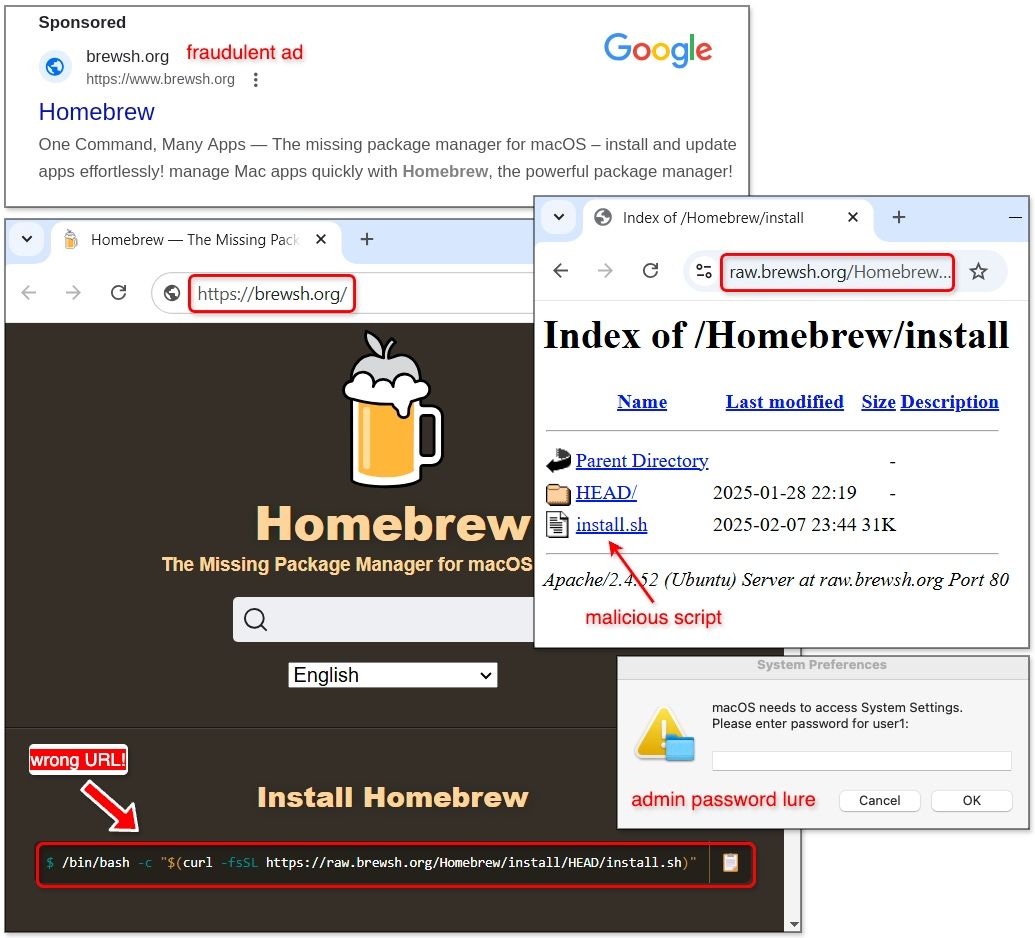
- January 2025 – Cybercriminals used fake Google ads mimicking the Homebrew website to target Mac users. Clicking the ad led to an infostealer malware that harvested credentials, browser data, and even cryptocurrency wallets. (Bleeping Computer)
- December 2024 – A large-scale malvertising campaign spread the Lumma Stealer malware through fake CAPTCHA verification pages. Users were tricked into running PowerShell commands, unknowingly installing malware. (Bleeping Computer)
These attacks prove that traditional antivirus alone isn’t enough.
Attackers are changing up their tactics, and businesses need real-time detection, behavioural analysis, and round-the-clock monitoring to ensure they’re preventing malvertising attacks.
Frequently Asked Questions
Where does malvertising typically appear?
Malvertising typically appears on well-known websites, social media platforms, and search engines. Cybercriminals purchase ad space on these trusted platforms, making the malicious ads seem legitimate. Once clicked, these ads can trigger malware downloads or redirect users to harmful sites.
What’s the difference between malvertising and ad malware?
Malvertising is the use of online advertisements to distribute malicious content, often through trusted ad networks. Ad malware, on the other hand, is a broader term referring to any type of malware that specifically targets advertising platforms, potentially manipulating ads or ad networks themselves to deliver harmful content.
Is malvertising a form of phishing?
Malvertising and phishing are related, but they’re not the same. While phishing involves tricking users into revealing personal information through deceptive emails or websites, malvertising uses online ads to deliver malware or direct users to fake sites. Both techniques are forms of social engineering, but malvertising primarily involves spreading malware rather than stealing sensitive data directly.
Stay Ahead of Cyber Threats with 24/7 Managed XDR
Don’t wait until an attack happens, stop threats in real time with proactive monitoring, behavioural detection, and expert SOC analysts. Learn more about CloudGuard Managed XDR here.